API Tokens
For programmatic access to Stack Automation and to use the different integrations Stack Automation has to offer, you will need to get a Stack Automation API Token.
Generate your API token
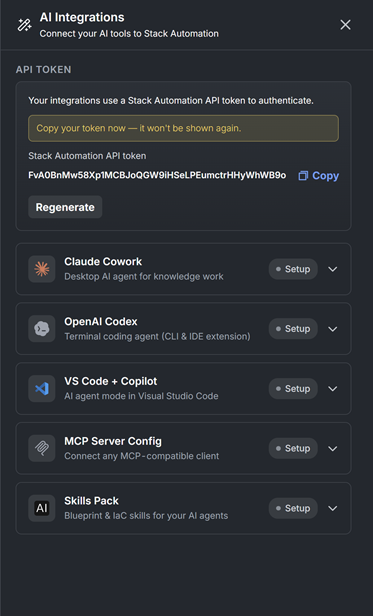
- Open Stack Automation and click the AI Integrations on the top bar (the side pane shown below will open).
- Click the Generate token button under API TOKEN and copy the generated Stack Automation API token.
- Store it somewhere safe — for security, the token is shown only once. If you lose it, use Regenerate to create a new one.
Important
Treat this token like a password. It grants the same access you have in Stack Automation. Do not commit it to source control or share it in plain text. If a token is exposed, click Regenerate to revoke the old one immediately.
Manage API Tokens
As an Admin, you can access the API Keys page under the Admin menu. This allows you to revoke or create new API tokens.