Scheduled Deployments
Scheduled deployments in Stack Automation allow users to plan and automate deployment launches for future time slots. This capability is particularly valuable for organizations that need to coordinate resource usage, plan maintenance windows, or ensure deployments are available at specific times for testing, demos, or development activities.
Overview
Deployment scheduling enables users to:
- Schedule deployment launches for future dates and times
- Reserve resources in advance to ensure availability
- Automate deployment lifecycle management around business schedules
- Optimize resource utilization across teams and projects
- Resolve scheduling conflicts with intelligent time slot recommendations
Blueprint Configuration
Allow Scheduling Flag
To enable scheduling for a blueprint, administrators must configure the "Allow Scheduling" flag in the blueprint's consumption policy settings.
Location: Blueprint Policy → Consumption Settings → Allow Scheduling
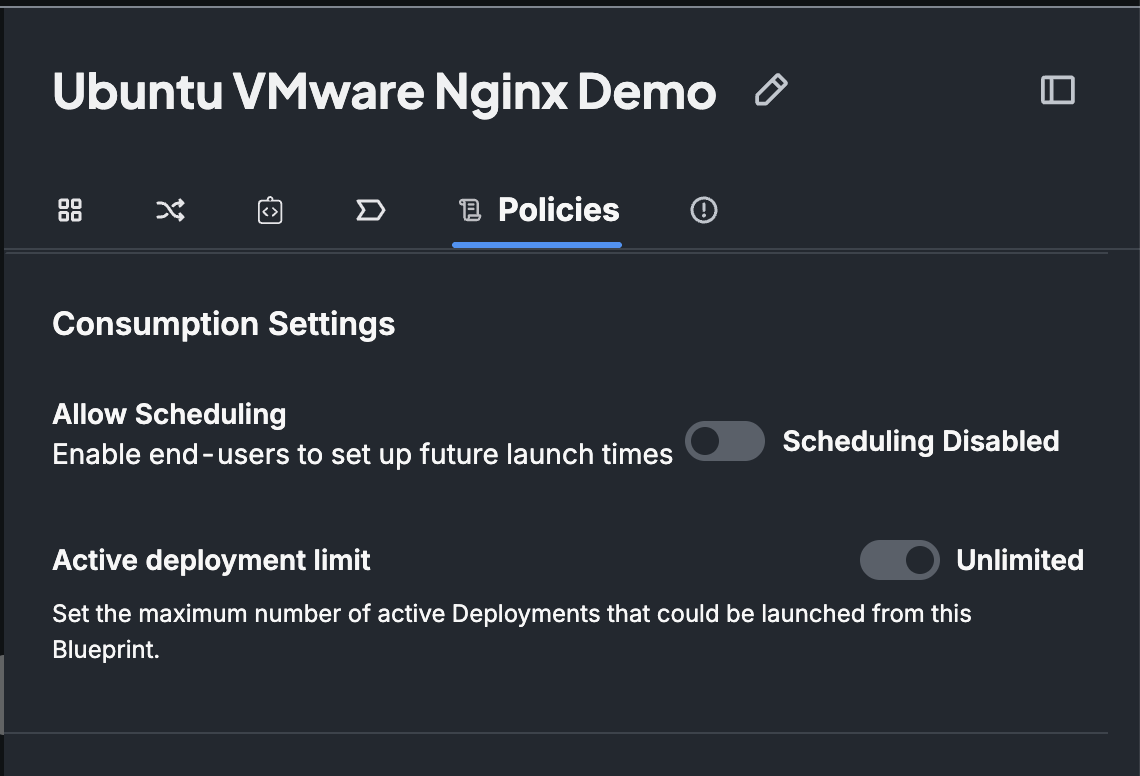
When this flag is enabled, users will see scheduling options when launching deployments from that blueprint. When disabled, deployments can only be launched immediately.
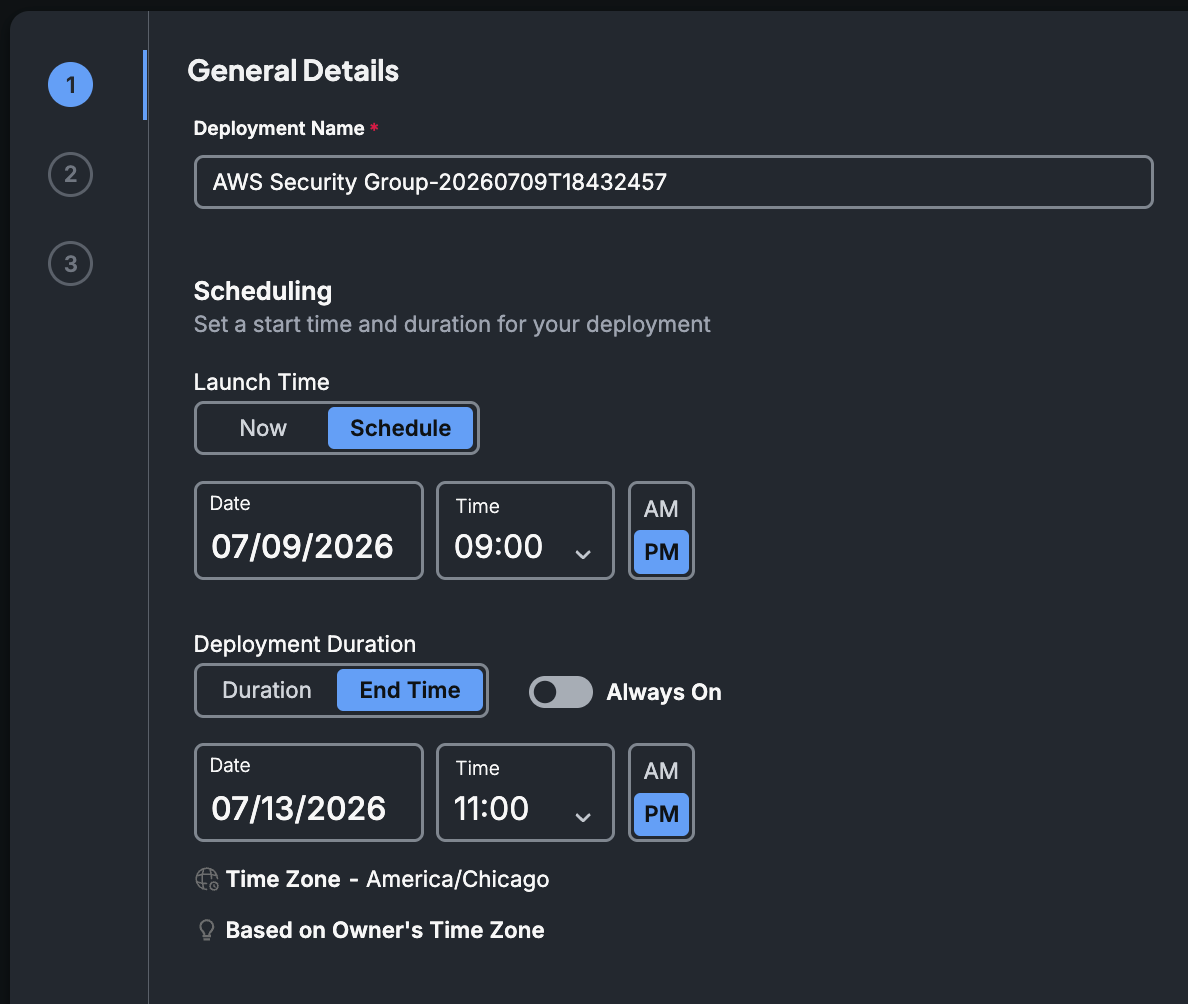
Use Cases
Development Team Coordination
Scenario: A development team needs their integration testing deployment available for an important sprint planning meeting next Monday at 9 AM.
Solution: Schedule the deployment to launch on Monday at 8:30 AM, giving the team a fresh deployment ready for their 9 AM meeting.
Benefits:
- Ensures deployment is ready before the meeting
- Provides a clean, consistent testing deployment
- Allows time for pre-meeting validation and setup
Demo Deployments
Scenario: Sales teams need demo deployments available during specific time windows for client presentations.
Solution: Schedule demo deployments in advance to ensure they're running and configured properly before important client meetings.
Benefits:
- Eliminates last-minute setup issues
- Ensures consistent demo experience
- Allows for pre-validation of demo scenarios
Resource-Intensive Workloads
Scenario: Data science teams need GPU-intensive deployments for model training during off-peak hours to optimize costs.
Solution: Schedule deployments to launch during low-cost time windows (e.g., nights and weekends) when cloud provider rates are lower.
Implementation:
- Schedule a specific launch for 10 PM when GPU rates drop
- Set automatic termination for 6 AM before peak pricing resumes
- Use custom resource inventory to ensure GPU availability
Compliance and Testing Windows
Scenario: Financial services company needs to run compliance testing in isolated deployments during specific maintenance windows.
Solution: Schedule compliant deployments during approved maintenance windows, ensuring they don't conflict with production systems.
Requirements:
- Strict time window enforcement
- Automatic termination after testing window
- Resource isolation from production systems
Custom Resource Inventory Integration
Scheduled deployments can leverage Stack Automation's custom resource inventory to ensure that required resources are available at the scheduled time. This integration prevents scheduling conflicts and guarantees resource availability.
Resource Reservation Process
- Resource Definition: Define custom resources in the inventory (e.g., GPU instances, specialized hardware, licenses)
- Capacity Planning: Set desired capacity for each resource type in blueprints
- Advance Booking: When scheduling deployments, Stack Automation reserves the required resources
- Conflict Prevention: The system prevents overbooking by checking resource availability
Example: GPU Resource Management
# Custom resource inventory configuration
resources:
  gpu_instances:
    selector:
      type: 'GPU'
      quantity: '{{ .inputs.gpus }}'
Here are some common "Resource Types" for scheduling:
Hardware Resources:
- GPU instances
- High-memory compute nodes
- Specialized processors (TPUs, FPGAs)
Software Licenses:
- Expensive enterprise software licenses
- Limited concurrent user licenses
- Specialized testing tools
Network Resources:
- Dedicated bandwidth allocations
- VPN connections
- Load balancer capacity
Scheduling Conflict Resolution
Stack Automation provides intelligent conflict resolution when scheduling conflicts occur, offering users alternative time slots that meet their requirements.
Conflict Detection
The system automatically detects conflicts when:
- Requested resources are already reserved
- Maximum concurrent deployments limit would be exceeded
- Blueprint capacity constraints would be violated
- Custom resource inventory capacity is insufficient
Next Available Time Slot
When conflicts are detected, Stack Automation offers the "Next Available Time Slot" feature:
- Conflict Notification: User is informed that their requested time slot is unavailable
- Alternative Suggestions: System presents the next available time slots that meet all requirements
- Requirement Matching: Suggested slots consider:
- Resource availability
- Duration requirements
- Blueprint constraints
- Custom resource needs
This comprehensive scheduling system ensures efficient resource utilization while providing the flexibility teams need to coordinate their development and testing activities effectively.