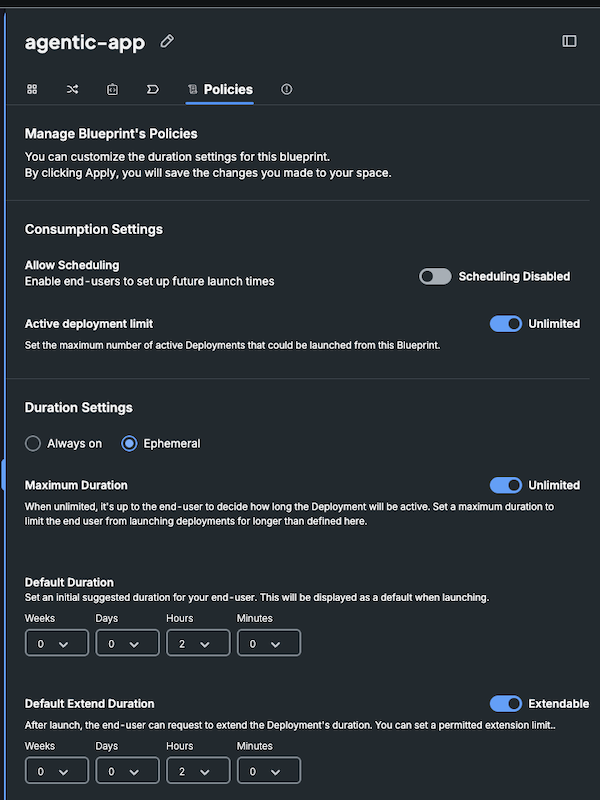
Blueprint Policies
As the blueprint designer, you can define the blueprint's default and max duration configurations or allow it to run indefinitely, to support scenarios that create a deployment that must be always online or delivers a static cloud resource.
To set the blueprint's policy:
- In the Blueprints page, open the blueprint and select its Policies tab.
- Set the consumption and duration settings as appropriate:
- Allow Scheduling: Enable end-users to set up future launch times for this blueprint.
- Active deployment limit: Set a permitted amount for active Deployments that could be launched from this Blueprint, or leave Unlimited.
- Ephemeral or Always on: Choose whether to provide an ephemeral option when launching the Blueprint or an always on option. When choosing an ephemeral option you are requested to provide the below additional information.
- Maximum Duration: Set the max duration or select Unlimited to allow the deployment end user to run the deployment indefinitely. Note that end-users will still have the option to end or extend the deployment at any time, regardless of its runtime policy.
- Default Duration: Set the default duration that is used when launching a new deployment.
- Default Extend Duration: Set the default duration when end-users extend the deployment.
- Click Apply.